
Sourcetable vs Quadratic: Who Is Each Spreadsheet Actually For?
Quadratic puts Python, SQL, and JavaScript inside a spreadsheet. Sourcetable puts natural language AI inside a spreadsheet. Both innovate on the traditional spreadsheet — but for very different users.

Andrew Grosser
June 1, 2026 • 7 min read
Quadratic is a genuinely innovative product. The idea of writing Python code directly in spreadsheet cells is powerful for developers. But it requires programming expertise, has no built-in financial data, and can't execute trades. Sourcetable is built for analysts who shouldn't need to code to get analytical work done.
Quick Comparison
| Feature | Sourcetable | Competitor |
|---|---|---|
| Benchmark Performance | ✅ 100% Vals.ai finance + 100% Rows.com | ❌ Not benchmarked |
| Primary Interface | ✅ Natural language AI | ❌ Python/SQL/JavaScript required |
| Financial APIs | ✅ 500+ built-in | ❌ Must code API calls manually |
| Trading Execution | ✅ Live via Robinhood | ❌ Not available |
| Data Scale | ✅ 1 billion row data lake | ⚠️ Infinite canvas, no documented limit |
| Target User | ✅ Business analysts, financial analysts | ⚠️ Developers, data scientists |
| Code Transparency | ⚠️ AI-generated (visible) | ✅ Full code visibility and editability |
| SOC 2 Certified | ✅ Yes | ✅ Yes |
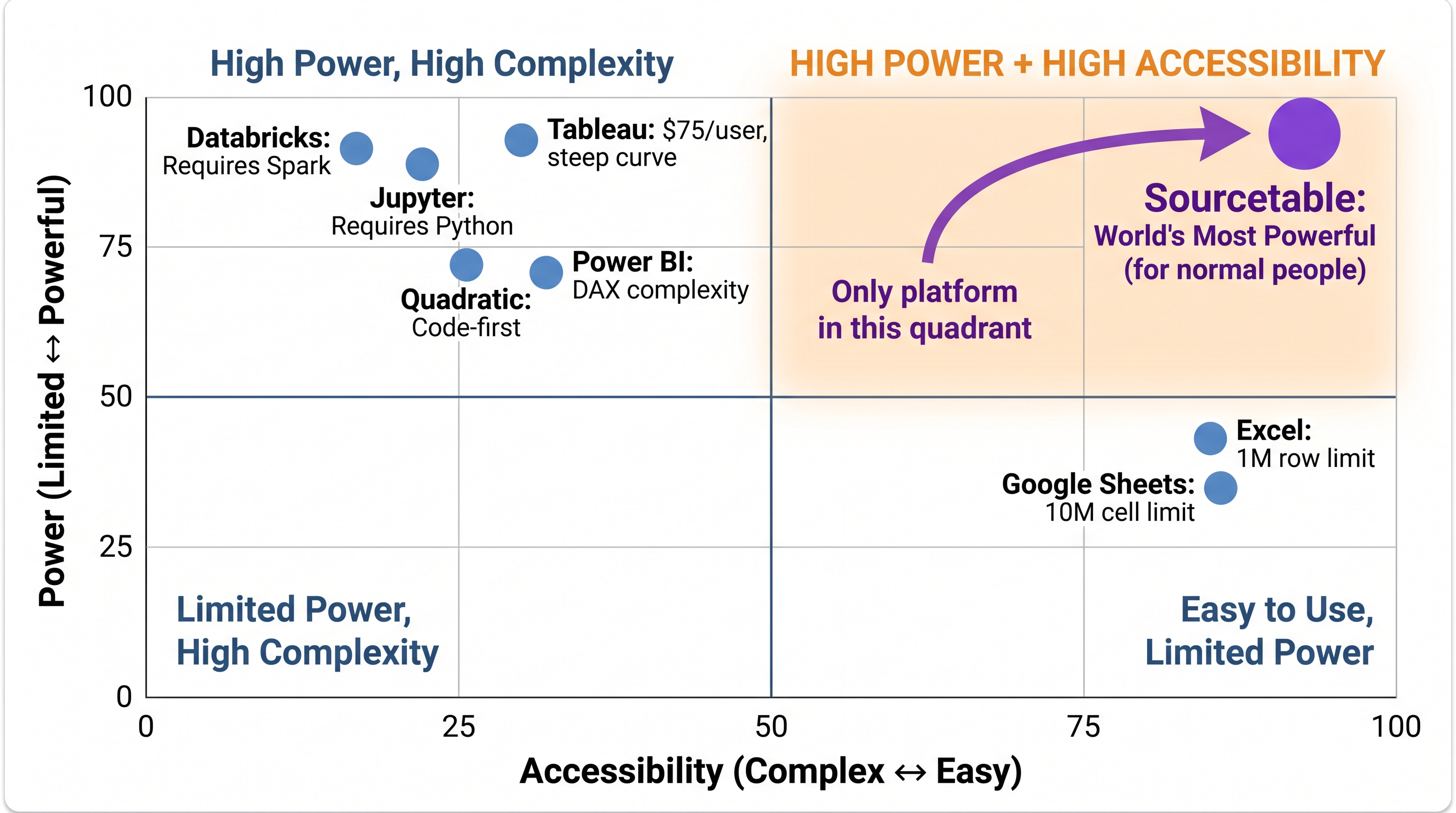
Sourcetable is the only analytical platform in the High Power + High Accessibility quadrant. Every competitor trades one for the other.
Code-Required vs Code-Optional
Quadratic's value proposition is that code belongs in spreadsheets. Python cells, SQL cells, JavaScript cells — all native. For developers who think in code, this is appealing. For financial analysts, operations managers, and business users — being required to write Python to analyze data is a barrier, not a feature. Sourcetable makes code optional: natural language handles everything, but Python and SQL are available when you want them.
Financial Tools: Built-in vs DIY
Quadratic has no built-in financial data sources. To pull Bloomberg data, you write API integration code. To run a Monte Carlo simulation, you build it in Python. Sourcetable's 500+ financial APIs connect automatically — Bloomberg, Refinitiv, FRED, SEC, and more — with auto-refresh and no coding required.
Who Should Use Quadratic
Choose Quadratic if:
- ✅ You're a developer or data scientist who prefers code in cells
- ✅ You want full transparency into AI-generated code
- ✅ You need JavaScript or multi-language cells in your analysis
- ✅ Your team is comfortable writing Python for every analysis task
- ✅ You don't need financial APIs or trading execution
Who Should Use Sourcetable
Choose Sourcetable if:
- ✅ You're an analyst who shouldn't need Python to analyze data
- ✅ You need financial APIs built-in (not coded manually)
- ✅ You want trading execution with compliance controls
- ✅ You prefer natural language AI over Python cells
- ✅ You process datasets at 1B row scale
- ✅ You need institutional financial tools (Monte Carlo, backtesting)
The world's most powerful analytical platform — free to try
100% benchmark scores. 500+ financial APIs. Spreadsheet interface. No coding required.
Start Free Trial →