
Sourcetable vs Power BI: Spreadsheet Simplicity vs BI Complexity
Power BI is Microsoft's enterprise BI platform. Sourcetable is the first AI spreadsheet with 100% benchmark scores, simple pricing, and no DAX required. This comparison breaks down when each platform wins.

Andrew Grosser
June 1, 2026 • 9 min read
Power BI is the dominant enterprise BI tool — especially for organizations already in the Microsoft ecosystem. But its licensing complexity (Free/Pro/Premium/Fabric), DAX formula language, and desktop app requirement push many teams to look for alternatives. Here's an honest comparison.
Quick Comparison
| Feature | Sourcetable | Competitor |
|---|---|---|
| Benchmark Performance | ✅ 100% Vals.ai finance + 100% Rows.com | ❌ Not benchmarked |
| Pricing Clarity | ✅ Simple team pricing | ❌ Free/Pro/Premium/Fabric complexity |
| Report Sharing | ✅ Share at any tier | ❌ Requires $14/user Pro minimum |
| Formula Language | ✅ Natural language AI | ❌ DAX has steep learning curve |
| Desktop App | ✅ True web-first | ❌ Desktop app required for authoring |
| Data Refresh | ✅ Unlimited | ❌ 8/day free, 48/day Pro |
| Financial APIs | ✅ 500+ built-in | ❌ Manual setup required |
| Microsoft Ecosystem | ⚠️ Independent | ✅ Deep Azure/Teams/Excel integration |
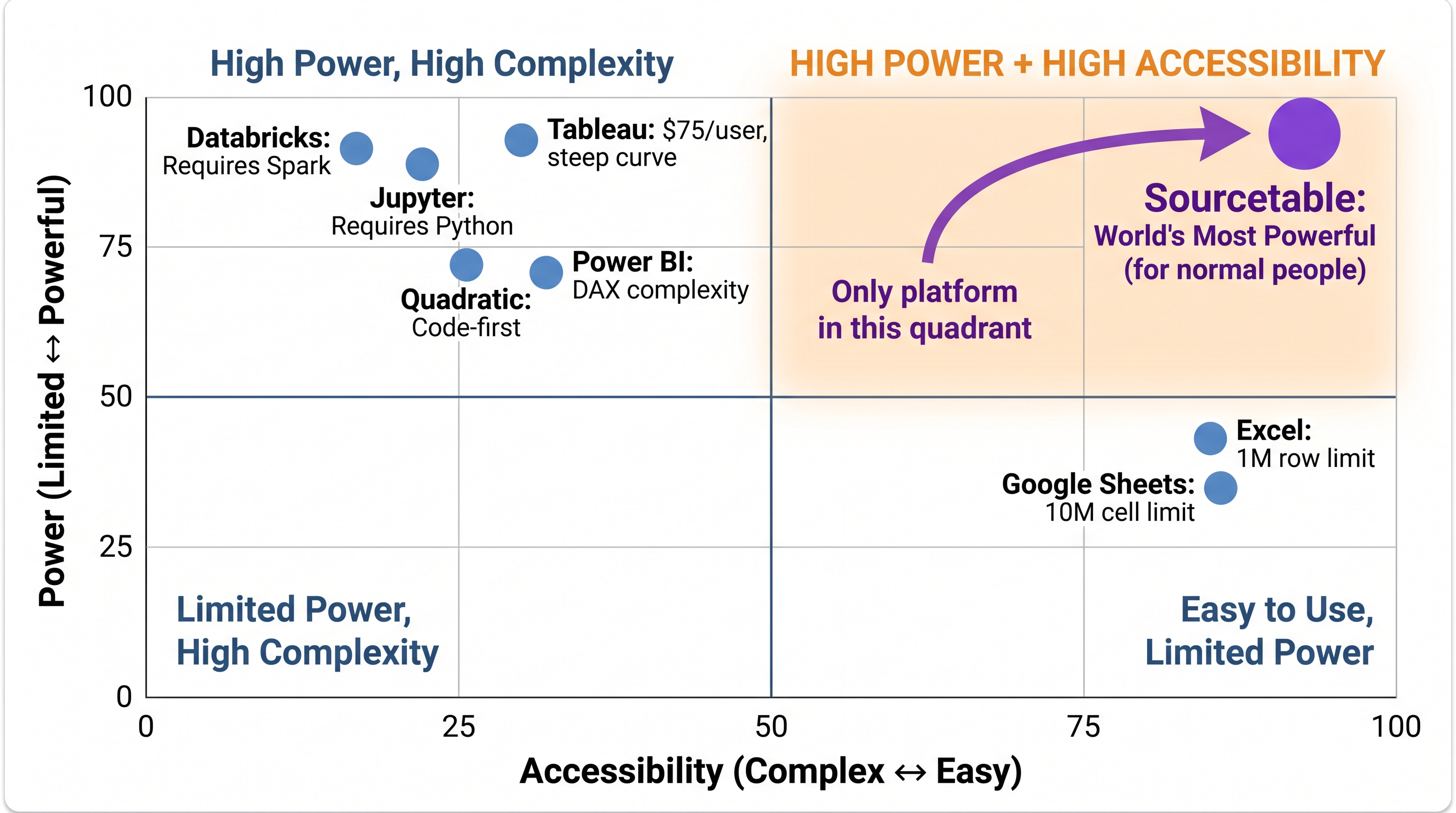
Sourcetable is the only analytical platform in the High Power + High Accessibility quadrant. Every competitor trades one for the other.
The Licensing Problem
Power BI's licensing is genuinely confusing. The Free tier can't share reports. Pro ($14/user) enables sharing but limits model sizes. Premium Per User ($24/user) unlocks AI features. Fabric capacity adds another layer of pricing on top. And Fabric still requires Pro licenses for content creators. A 50-person team can easily spend $8,400+/year just to share basic reports — before adding any enterprise features.
DAX vs Natural Language
DAX (Data Analysis Expressions) is Power BI's formula language. It's powerful but has a significant learning curve — most analysts require dedicated training before they can write complex DAX measures. Sourcetable replaces DAX entirely with natural language AI. Describe what you want in plain English and get the analysis. No formula language to learn.
Data Refresh Limits
Power BI Free allows 8 data refreshes per day. Power BI Pro allows 48. Sourcetable includes unlimited data refresh from 500+ APIs — your dashboards update automatically without counting refreshes.
When Power BI Is the Better Choice
Choose Power BI if:
- ✅ Your organization is deeply invested in Microsoft 365/Azure ecosystem
- ✅ You need native integration with Teams, SharePoint, and Excel
- ✅ You have BI analysts trained on DAX and Power Query
- ✅ You need Power BI's specific visualization types
- ✅ Enterprise governance via Microsoft Purview is a requirement
When Sourcetable Is the Better Choice
Choose Sourcetable if:
- ✅ You want to escape Free/Pro/Premium/Fabric pricing confusion
- ✅ You need to share reports without paying $14/user minimum
- ✅ You prefer natural language over learning DAX
- ✅ You need financial analysis with 500+ data APIs
- ✅ You want unlimited data refresh without counting quotas
- ✅ You want a true web-first platform (no desktop app install)
The world's most powerful analytical platform — free to try
100% benchmark scores. 500+ financial APIs. Spreadsheet interface. No coding required.
Start Free Trial →