
Sourcetable vs Jupyter Notebooks: AI Spreadsheet vs Python Notebooks
Jupyter is the gold standard for data scientists writing Python. Sourcetable is the first AI spreadsheet built for business analysts — 100% benchmark scores, natural language AI, and 500+ financial APIs without writing a single line of code.

Andrew Grosser
June 1, 2026 • 9 min read
Jupyter Notebooks have powered data science for over a decade. They're free, extensible, and beloved by Python programmers. But if you're a business analyst, financial analyst, or operations professional — Jupyter wasn't built for you. This comparison covers both platforms honestly, including when Jupyter is genuinely the better choice.
Quick Comparison
| Feature | Sourcetable | Competitor |
|---|---|---|
| Benchmark Performance | ✅ 100% Vals.ai finance + 100% Rows.com | ❌ Not benchmarked |
| User Interface | ✅ Spreadsheet + natural language AI | ❌ Python code cells required |
| Financial Data APIs | ✅ 500+ built-in (Bloomberg, Refinitiv) | ❌ Must code API calls manually |
| Trading Execution | ✅ Live via Robinhood | ❌ Not available |
| Data Scale | ✅ 1 billion row data lake | ⚠️ Limited by local machine memory |
| Learning Curve | ✅ Immediate — spreadsheet interface | ❌ Requires Python expertise |
| Cost | ✅ Simple team pricing | ✅ Free, open-source |
| Code Flexibility | ⚠️ Python/SQL available optionally | ✅ Full Python/R/Julia ecosystem |
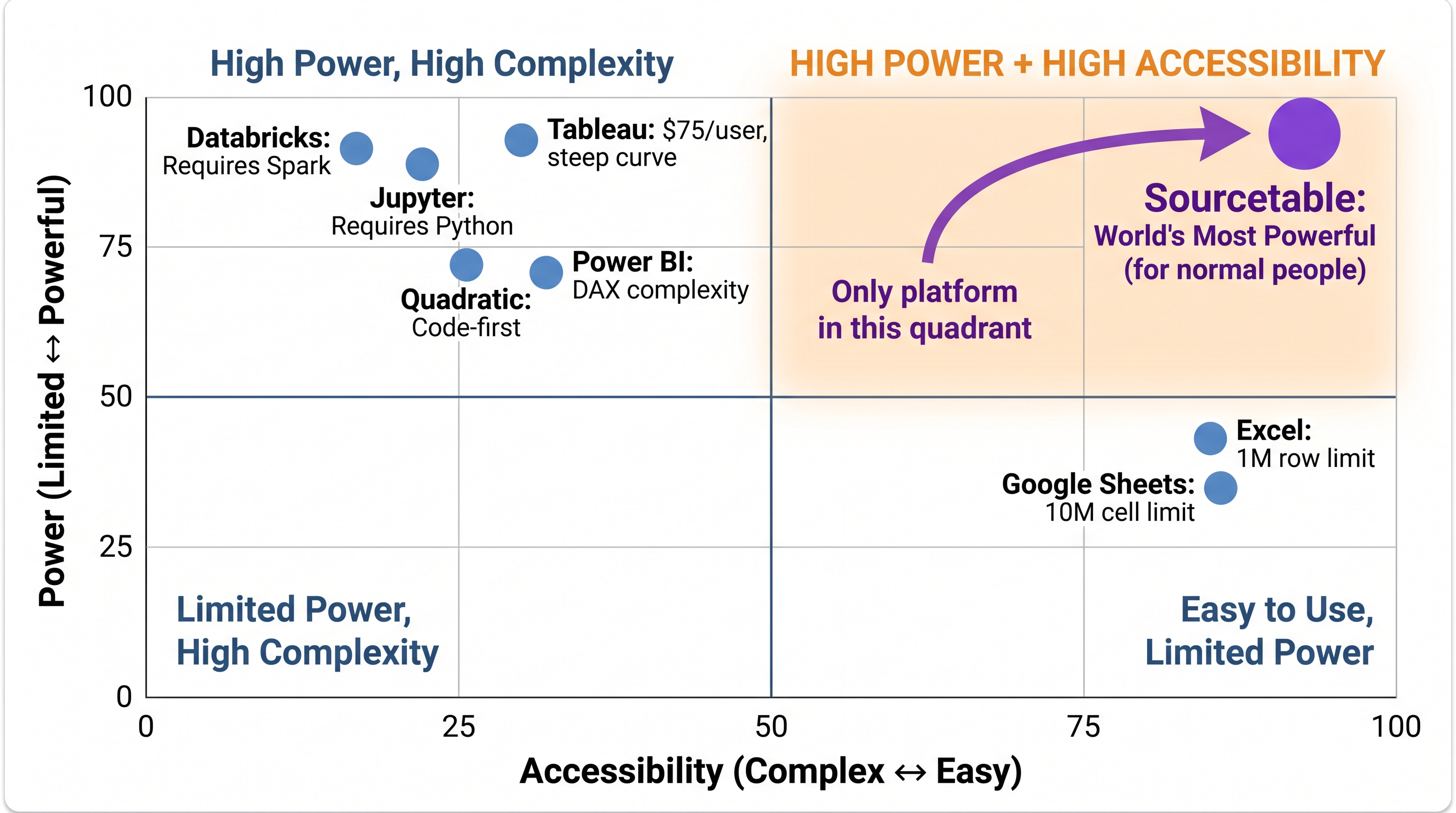
Sourcetable is the only analytical platform in the High Power + High Accessibility quadrant. Every competitor trades one for the other.
The Core Difference
Jupyter is a code-first platform. Everything you do requires writing Python (or R, or Julia). That's a feature for data scientists — and a barrier for everyone else. Sourcetable flips this: natural language AI is the primary interface, and code execution (Python, R, C, C++) is available when you need it. Same power. Radically different accessibility.
Benchmark Performance
Sourcetable achieved 100% on the Vals.ai finance agent benchmark — where Claude Opus 4.5 scored 67% — and 100% on the Rows.com spreadsheet benchmark. Jupyter doesn't participate in these benchmarks because it's a general-purpose coding environment, not a purpose-built analytical platform. The comparison isn't about who wins — it's about what each tool was built to do.
Data Scale: 1 Billion Rows vs Local Memory
Jupyter is constrained by your local machine's RAM. Load a 10GB CSV and you'll likely crash your kernel. Sourcetable's built-in data lake queries 1 billion rows in seconds, and our client-side processing engine handles multi-gigabyte datasets entirely in the browser with zero cloud costs per query. For large-scale financial analysis, this is a meaningful difference.
Financial Analysis: Built-in vs DIY
To run a Monte Carlo simulation in Jupyter, you write the code from scratch. To pull data from Bloomberg, you write API integration code. To backtest a portfolio, you build the framework yourself. Sourcetable includes all of this: 500+ financial APIs with auto-refresh, Monte Carlo simulations, portfolio backtesting with realistic transaction costs, stress testing, and live trading execution via Robinhood.
When Jupyter Is the Better Choice
Choose Jupyter if:
- ✅ Your team consists of data scientists comfortable writing Python/R daily
- ✅ You need reproducible research notebooks for academic publication
- ✅ You require the full Python ecosystem (PyTorch, TensorFlow, custom libraries)
- ✅ Budget is a primary constraint (Jupyter is free)
- ✅ You're building ML models, not financial analysis workflows
When Sourcetable Is the Better Choice
Choose Sourcetable if:
- ✅ You're a business analyst, financial analyst, or operations professional
- ✅ You need financial data from 500+ APIs without coding integrations
- ✅ You want to execute trades directly from your analysis
- ✅ You process datasets larger than local machine memory allows
- ✅ Your team shouldn't need to learn Python to get analytical work done
- ✅ You need natural language AI, not Python expertise
The world's most powerful analytical platform — free to try
100% benchmark scores. 500+ financial APIs. Spreadsheet interface. No coding required.
Start Free Trial →