
Sourcetable vs Microsoft Excel with Copilot: How Far Has AI Come?
Excel with Copilot brings AI to the world's most popular spreadsheet. Sourcetable was built from the ground up as the first AI spreadsheet. The difference? Excel hit its architectural limits in 1985. Sourcetable was designed for 2026.

Andrew Grosser
June 1, 2026 • 10 min read
Excel is the most used analytical tool on Earth. Microsoft Copilot adds AI assistance to it. But adding AI to a 40-year-old architecture doesn't fix Excel's fundamental limits: 1,048,576 row cap, no live data API connections, no trading execution, and a desktop app that runs on Windows. Here's what's actually different.
Quick Comparison
| Feature | Sourcetable | Competitor |
|---|---|---|
| Benchmark Performance | ✅ 100% Vals.ai finance + 100% Rows.com | ❌ Not benchmarked on AI tasks |
| Row Limit | ✅ 1 billion rows (data lake) | ❌ 1,048,576 row hard limit |
| Live Data Connections | ✅ 500+ APIs with auto-refresh | ❌ Manual file imports only |
| Trading Execution | ✅ Live via Robinhood | ❌ Not available |
| Code Execution | ✅ C/C++/R/Python via WebAssembly | ❌ VBA macros only |
| Platform | ✅ True web-first | ❌ Desktop app required (Windows/Mac) |
| License Requirement | ✅ Standalone platform | ❌ Microsoft 365 Enterprise required |
| Familiarity | ⚠️ Spreadsheet interface (familiar) | ✅ Excel — most familiar tool on Earth |
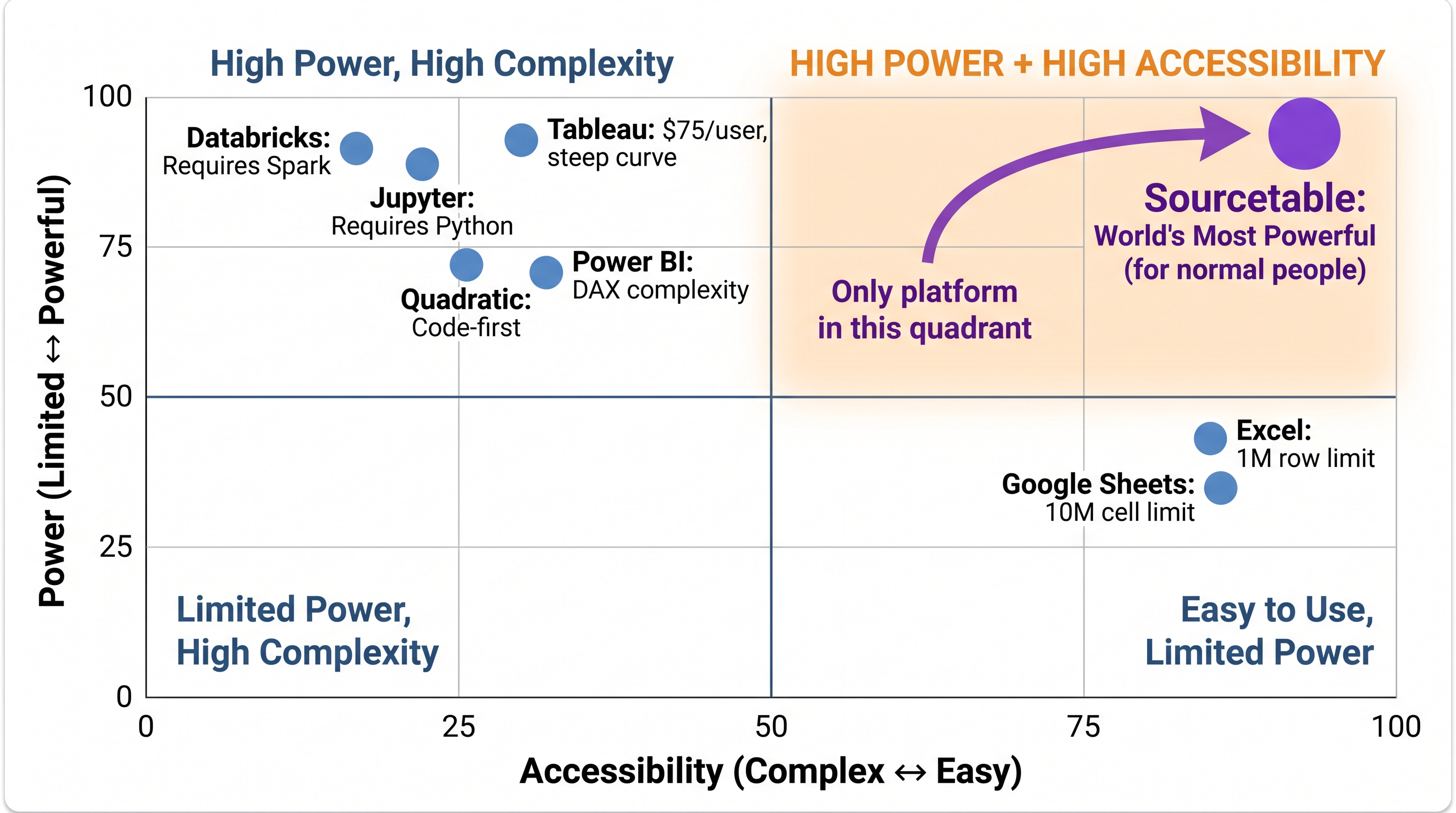
Sourcetable is the only analytical platform in the High Power + High Accessibility quadrant. Every competitor trades one for the other.
The 1 Million Row Problem
Excel's row limit is 1,048,576. That number hasn't changed since Excel 2007. If your dataset is larger — a year of transaction data, a full customer database, intraday market prices — Excel simply can't open it. Sourcetable's data lake queries 1 billion rows in seconds. Our client-side processing engine handles multi-gigabyte datasets in the browser with zero cloud costs.
Live Data vs Manual Imports
Excel Copilot can help you analyze data that's already in your spreadsheet. It cannot connect to Bloomberg, pull live market prices, or auto-refresh from your database. Every data update requires a manual export and re-import. Sourcetable's 500+ API connectors update automatically — your analysis is always current without manual intervention.
Benchmark Results
Sourcetable achieved 100% on the Vals.ai finance agent benchmark (vs Claude Opus 4.5's 67%) and 100% on the Rows.com spreadsheet benchmark. Excel with Copilot was not evaluated in either benchmark — Microsoft focuses on productivity tasks, not financial analysis benchmarks.
Code Execution: WebAssembly vs VBA
Excel's scripting environment is VBA — a language designed in the 1990s. Sourcetable runs C, C++, R, and Python via WebAssembly in a patent-pending sandboxed execution environment. This allows multi-language execution with institutional-grade security — something fundamentally impossible in Excel's architecture.
When Excel with Copilot Is the Better Choice
Choose Excel with Copilot if:
- ✅ Your organization is deeply committed to Microsoft 365 (Teams, SharePoint, Outlook)
- ✅ Your datasets are under 1 million rows
- ✅ You need maximum interface familiarity for non-technical users
- ✅ You have existing Excel models with complex VBA you can't migrate
- ✅ Enterprise Microsoft governance (Purview, Azure AD) is a hard requirement
When Sourcetable Is the Better Choice
Choose Sourcetable if:
- ✅ Your datasets exceed Excel's 1M row limit
- ✅ You need live data connections from 500+ APIs
- ✅ You want to execute trades directly from your analysis
- ✅ You need multi-language execution (C/C++/R/Python) not VBA
- ✅ You want a true web-first platform without desktop app dependencies
- ✅ You don't want to pay for Microsoft 365 Enterprise just for Copilot
The world's most powerful analytical platform — free to try
100% benchmark scores. 500+ financial APIs. Spreadsheet interface. No coding required.
Start Free Trial →