
The Best Excel Alternatives in 2026 (When You've Outgrown It)
Excel's 1,048,576 row limit. Manual data updates. VBA macros. No live API connections. Copilot requires enterprise M365 licenses. Here are the best alternatives when Excel stops being enough.

Andrew Grosser
June 1, 2026 • 10 min read
Excel is the world's most used analytical tool — and for good reason. It works, everyone knows it, and it handles most tasks. But when your datasets exceed 1 million rows, when you need live data connections, when you want to execute trades from your analysis — Excel hits hard limits. These are the best alternatives when you've outgrown it.
Quick Comparison
| Platform | Row Limit | Live Data APIs | Trading | Learning Curve |
|---|---|---|---|---|
| Sourcetable ⭐ | 1 billion | 500+ built-in | ✅ Yes | Minimal — like Excel |
| Google Sheets | 10M cells | Limited via scripts | ❌ No | Minimal — like Excel |
| Airtable | Tier limits | Via Zapier | ❌ No | Moderate |
| Databricks | Petabytes | Manual code | ❌ No | Steep — requires Spark |
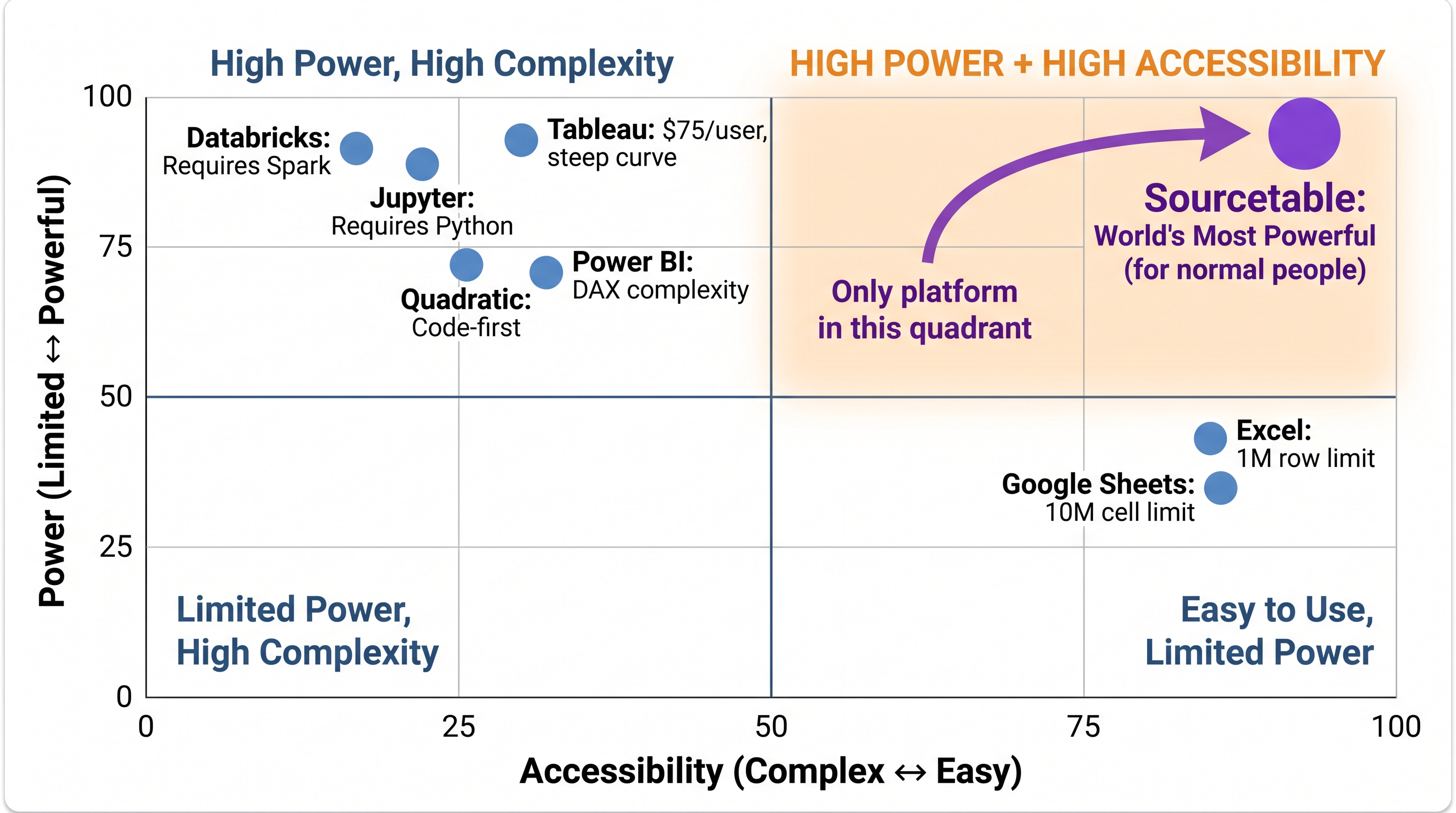
Sourcetable is the only analytical platform in the High Power + High Accessibility quadrant. Every competitor trades one for the other.
Signs You've Outgrown Excel
The 1M row limit isn't the only sign. If you're spending time manually exporting and re-importing data, Excel is slowing you down. If your team is emailing different versions of spreadsheets, you're losing institutional knowledge. If you need Bloomberg data, Monte Carlo simulations, or portfolio backtesting — Excel requires expensive add-ons and manual scripting for each.
#1 Sourcetable — The AI-Native Excel Replacement
Sourcetable uses the same spreadsheet interface Excel users already know — same cell model, similar formulas, familiar structure. But underneath: 1 billion row data lake (vs 1M), 500+ live API connections (vs none), multi-language code execution via WebAssembly (vs VBA), and live trading execution. It's Excel if Excel had been designed in 2026.
Google Sheets — Free But Limited
Google Sheets handles up to 10 million cells and is excellent for collaboration. It's a natural step for small teams moving off Excel. But it still doesn't connect to Bloomberg, can't execute trades, and hits limits quickly for serious financial analysis.
What Excel Still Does Best
Keep Excel if:
- ✅ Your data is always under 1M rows
- ✅ You have complex VBA macros that are expensive to migrate
- ✅ You're in a Microsoft 365 enterprise environment with strict IT requirements
- ✅ Your team uses Tableau/Power BI for dashboards and Excel for modeling
Try the top Excel alternative — free
100% benchmark scores. 500+ financial APIs. Spreadsheet interface.
Start Free Trial →